Apple Watch
Watch app, complications, and wrist-first location/activity controls.
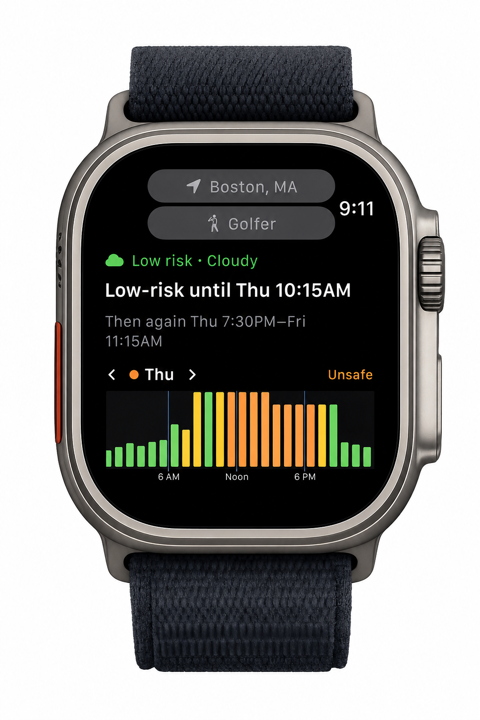
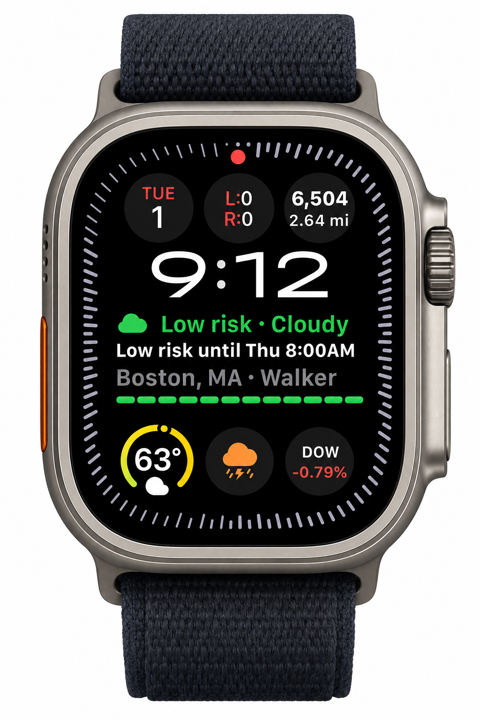
Storm Window on Apple Watch shows your current outdoor-risk verdict, safe-window headline, and compact hourly risk chart without making you pull out your iPhone. Complications put the same guidance directly on your watch face.
The iPhone seeds the Watch with saved locations, forecasts, subscription state, custom activity profiles, and each location’s last paired activity. After that, the Watch app can own what you want on your wrist right now.
- Watch app
- Complications
- Pull to refresh
- Works away from iPhone
What the Watch app shows
Current verdict
Shows the same iPhone risk categories: Low risk, Use caution, Unsafe, or Dangerous.
Safe-window headline
Plain language like “Low-risk until 8:30PM” or “Safe window Mon 8:30PM.”
Location and activity
Displays the selected place and activity so you know what the forecast is being judged against.
Hourly risk chart
Compact bars or dots show the next hours, with touch-and-hold chart-style switching on the Watch.
Daily context
Best window, peak risk, next change, and driver rows summarize what matters most for the day.
Outdoor Session
Optional session surfaces keep current risk and remaining usable time visible until you end them.
Refresh status
Shows whether the latest forecast came from iPhone relay, direct Watch fetch, or cached offline data.
Pull to refresh
Request a fresh forecast from the Watch when you want a user-initiated update.
Location and activity behavior
The Watch starts from the iPhone-relayed state, but local Watch changes are respected. If you switch the Watch app from one place or activity to another, default Watch complications follow that wrist context.
Watch app
Location: Uses the place selected on the Watch, including Watch Current Location.
Activity: Uses the activity selected on the Watch, falling back to the paired iPhone activity when needed.
Default complication
Location: Follows the current Watch app location.
Activity: Follows the current Watch app activity.
Pinned-location complication
Location: Stays pinned to the saved location chosen in the complication editor.
Activity: Uses that location’s paired activity first, then falls back to the Watch app or iPhone activity.
Pinned-activity complication
Location: Uses its selected location behavior.
Activity: Stays pinned to the activity chosen in the complication editor.
Complications
Storm Window supports rectangular, inline, circular, and corner Apple Watch complications. They show the current verdict or safe-window headline at a glance, then open the Watch app when tapped. Rectangular complications can also include a tiny risk ribbon for the next hours. When WidgetKit asks a complication for a new timeline, the complication can also fetch forecast data directly from the Watch if its cached forecast has aged out.
| Capability | Included |
|---|---|
| Watch app | Available to everyone, with current verdict, safe-window headline, location/activity context, and compact risk chart. |
| Default complications | Available to everyone, following the current Watch app location and activity. |
| Pinned complications | Storm Window Pro lets you pin a saved location or activity from the complication editor. |
| Outdoor Session surfaces | Storm Window Pro keeps risk and remaining time visible across supported iPhone, Watch, Lock Screen, and Dynamic Island surfaces. |
Default behavior
A default complication is labeled Follow Watch App. If the Watch app is showing Boston for Running, the complication follows Boston for Running. If you change the Watch app to Shoe Ranch for Golf, the complication follows that.
Explicit configuration
Storm Window Pro lets you pin a saved location or activity in the complication editor. Pinned fields stay pinned; unpinned fields continue to follow the Watch app or the location’s paired activity.
With or without iPhone
With your iPhone nearby, the Watch receives fresh forecasts, saved locations, activity profiles, and settings through WatchConnectivity. Complications reload when that relayed data changes.
The Watch can also refresh without the iPhone. The Watch app can request a fresh forecast directly over the Watch’s own network connection when the cache is stale or you pull to refresh, which is especially useful on cellular Apple Watch models. It also recomputes the headline from cached forecast data as time passes, so the safe-window timing stays current between network refreshes.
Complications can also fetch directly from the Watch during WidgetKit timeline refreshes, but those background refreshes are scheduled and budgeted by watchOS. For a guaranteed user-initiated update, open the Watch app and pull to refresh.
The Watch app can set a Watch Current Location using a one-time, city-scale location fix from the Watch.
Current limits
- Use the iPhone app to add, rename, delete, and organize saved locations.
- The Watch app does not schedule the iPhone’s imminent-hazard local notifications.
- watchOS controls complication background refresh timing, so refreshes may be less immediate than opening the Watch app.
More
- Storm Window website
- Apple Watch in the User Guide
- Support
- Capabilities
- Privacy Policy
- Storm Window on the App Store
Not a safety device
Storm Window provides forecast guidance and weather-risk context only. It is not a certified lightning safety system, emergency alert system, medical app, or guarantee of safe conditions. Do not wait for Storm Window: when thunder roars, go indoors.